
Family sharing
Everyone who loves the drawings, in one place
Stop sending the same photo to six people. Invite family to your Squiglet library and they see every new picture as it arrives.
Private to the people you invite.
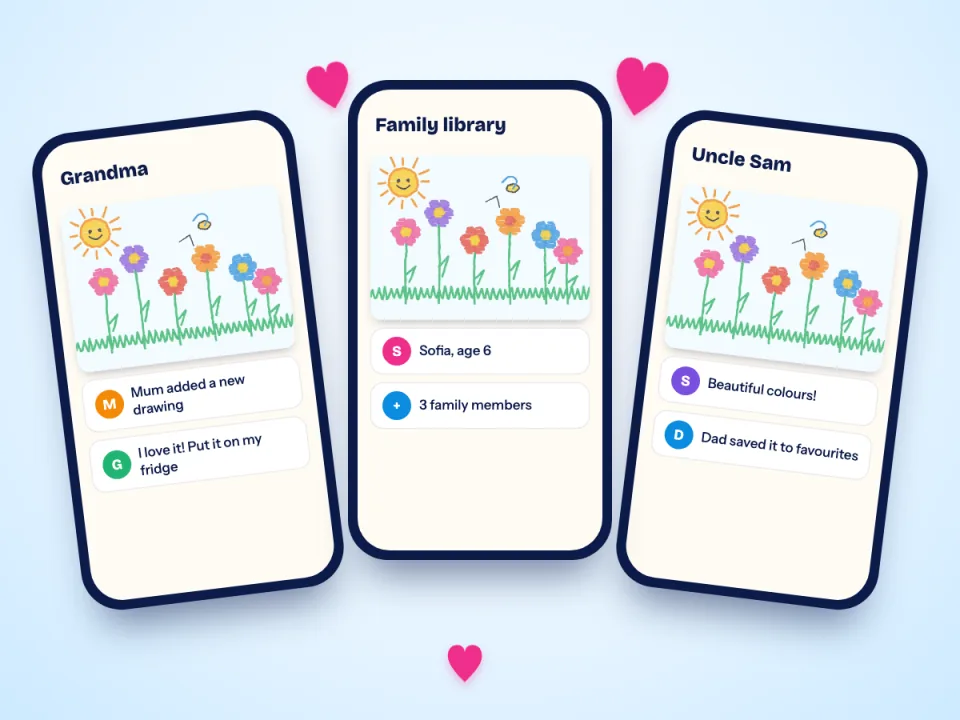
Who sees what
You stay in charge
Invite by email
Send an invitation to parents, grandparents, godparents or friends. They join with their own account.
Choose what they can do
Parents can add and organise. Others can look, favourite and enjoy. Remove anyone at any time.
Know when something is new
Family get one friendly notice for a batch of new pictures, never one for every picture.
Their own favourites
Each person keeps a private list of favourites that does not change anyone else's.
A link for one picture
Send a link to a single picture to someone outside the family. Links expire, and you can switch them off.
Near or far
Relatives on the other side of the world see the same library, on iPhone or Android.
Safe by default
Nobody finds your library by accident
Your family library is invitation-only. A share link works only for the picture you chose, and expires. You can see who has access, and take it away, from the app.
Related guides
How to Store Kids' Artwork: 9 Ideas That Actually Work
A calm, practical plan for the drawings, paintings and school projects that arrive faster than you can find places for them.
How to Photograph Your Child's Artwork (So It Looks Great)
Ten simple habits for clear, colourful photos of drawings and paintings, using nothing but your phone and a window.
How to Decide What Kids' Artwork to Keep (and What to Let Go)
You do not have to keep everything to honour it. A gentle framework for choosing what stays.
Start a family library
Join the waitlist and invite the grandparents when Squiglet launches.
Free to start. No card needed.